PocketBook Customization
Change the lockscreen image
Pocketbook Era lockscreen / standby image - MobileRead Forums
- Plug in pocketbook (I have Pocketbook Era (pb700) but I guess works for others too?)
- Make sure all system folders are visible, I use Total Commander and it's under "Configuration > Options > Display > Show system files (checkbox)"
- Go to the "
system" folder - Create folders like this: "
system/resources/Line/" - Now paste the image you want to be your lockscreen image (note, I'm talking about the lock screen image, not turn off or on image!). But make sure they have the same format, same color background as the source images, and have the same names
- Disconnect your PocketBook Era and see if the lockscreen works!
6.1 Just in case, details of each .BMP file:
taskmgr_lock_background.bmp https://i.imgur.com/0hkzPfr.png
taskmgr_lock_background_landscape.bmp https://i.imgur.com/8sMKjyt.png
6.2 You can just download and paste the archive sent by kaznelson, edit your picture in Photoshop, make it B&W (black and white) remove the existing image by just painting it over with the background color. And then just paste the image you edited (preferably a cut out in the shape of the image you want)
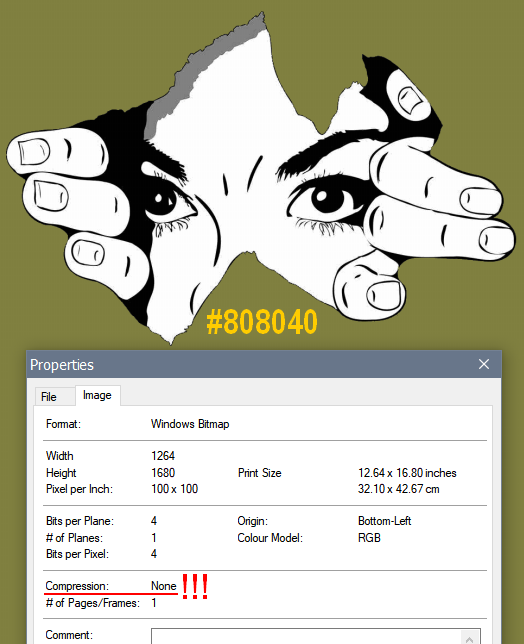
Do not compress this bmp-file!
#808040 - this color will be transparent on the PB-device.
Additional Customizations and Mods for KOReader + PocketBook
PocketBook customizations
https://github.com/jjrrw174/PocketBook-Desktop-and-App-Customizations
Installing dictionaries
How to Install KOReader on Pocketbook eReaders | The eBook Reader Blog
Some helpful comments on getting KOReader to work on PocketBook:
KOReader on Pocketbook Era, Wow! : r/pocketbook
Synchronization issues: Rebooting has seemed to help with wifi and synchronization issues. I had it set to 24 hours, but I've now reduced it to 8 (maybe 4)
KOReader: Removing the annoying in-margin page numbers: how to remove the annoying original pagebreaks from an epub? - MobileRead Forums
Sigil: Correcting font-weight in ebooks with unreadable fonts:
- search for "font-weight" in the CSS style document
- 400 is "normal"; less is thinner, more is bolder.
- font-weight - CSS: Cascading Style Sheets | MDN
- You can set the values to slightly different weights in case you want to revert them
- e.g., 401, 402, 399, etc.