Creating a plugin for Obsidian with ChatGPT
6 months ago, I had a 48-hour fever dream in which I created a plugin for Obsidian. I had just started using Obsidian, and was giving the obsidian-list-style plugin by Eric Rykwalder a try, and I dreamt that I used ChatGPT the heavy lifting, fine-tuned the output, followed Obsidian's guides on creating a plugin, and published a plugin that automatically assigned CSS list styles to ordered lists. 6 months later, I discovered I wasn't hallucinating when someone submitted an issue asking me to add automatic list styles to unordered lists.
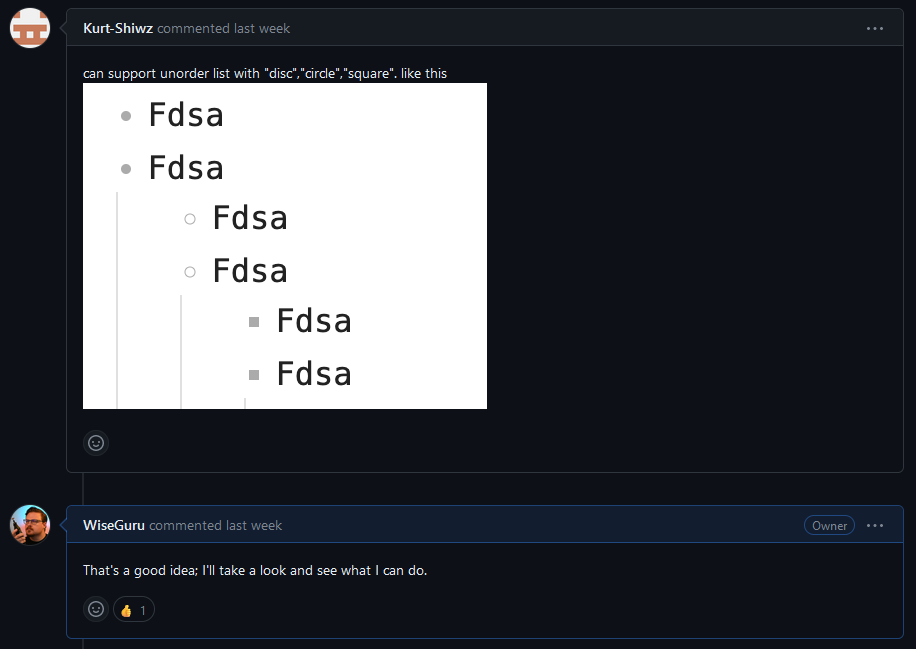
So now I have to figure out what the heck I did six months ago and update the plugin to also work on unordered lists.
A True Detective
I try to go retrace my steps from 6 months ago; I vaguely remember that I created a test vault for testing, that the plugin is written in Typescript and then converted to Javascript, and that I made sure ChatGPT inserted comments (or explained sections of code to me so I could comment it) to help future-Max figure out wtf past-Max did, and present-Max appreciates it.
I had trouble right off the bat, because while I remembered that there were things I had to do that wasn't included in the script in order for the Typescript to get converted to Javascript, I didn't know what those things were. I looked around online and rediscovered the Obsidian Hub guide on creating your own plugin. For reference, I've included three main guides here that are relevant.
How to get started developing plugins
How to add your plugin to the community plugin list
How to release a new version of your plugin
(Also interestingly, it looks like Obsidian doesn't implement secure site headers; I've mostly solved this issue for ccnadefinitions.com using the Digital Garden plugin, but it can be a little tricky to implement; full details can be found here: How to host a Digital Garden on Cloudflare
Before you get started, you need to install Node.js; however, I recommend installing a Node version manager (NVM) instead, such as this one for windows or this one for macOS and Linux. It allows you to rapidly install and switch between different versions of node to resolve any versioning issues. So, install your NVM, choose the version, and keep going. I already have Node installed (without the NVM), so we move on.
NOTE: If you're following along at home, I'm working on a Windows computer because I'm a scrub, so everything I do is through that lens.
I'm going to use Visual Studio Code to edit the code. After you create your own plugin repo from the Obsidian template, open Visual Studio and click "Clone Git Repository..." and select the repo you want to work on (in my case, the existing plugin). It asks where to save the local repository, and I went to the test vault I created earlier and chose the "plugin" folder.
C:\Users\Max\Obsidian Notes\Test Vault\.obsidian\plugins
By selecting the "plugin" folder, I can quickly test the plugin by reloading Obsidian every time I make a change. It creates a folder in "plugins" with the name of the repository, and I can get started breaking and fixing!
The "getting started" article says that you start by installing all the required packages. If you're following along at home, you should probably also run npm update to check for updates and fix vulnerabilities, but you can also just run npm audit fix to fix any vulnerabilities without updating other packages.
npm install
npm update
npm audit fix
Then the guide directs you to run start NPM in dev mode (npm run dev) to actively build and convert the plugin as you're working on it. But at this point, I ran into a problem; the esbuild.config.mjs file was missing a banner definition.
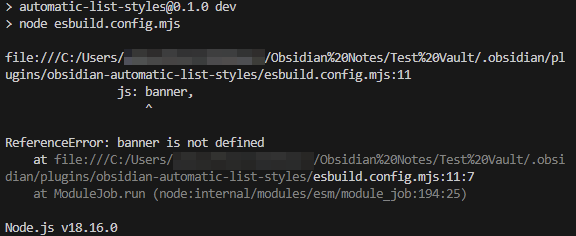
Not sure how I managed to get this created without a banner last time, but oh well; I copy the text from Obsidian's sample plugin, save it, and re-run npm run dev
PS C:\Users\...\obsidian-automatic-list-styles> npm run dev

> automatic-list-styles@0.1.0 dev
> node esbuild.config.mjs

[watch] build finished, watching for changes...
Before you start working, be sure to update the version in the following files.
- version.json
- It's in the format of
"<plugin latest version>": "<compatible Obsidian version>"- e.g., "0.1.0": "1.0.0"
- It's in the format of
- package.json
- Right at the top
- package-lock.json
- Twice, both near the top
- manifest.json
- Top again, also change the name etc. as per Obsidian's guide
- ProbablySomeOtherFile_I_Missed.json
- You should probably just check everything five or more times to be safe.
When you want to stop making changes, you can terminate the command with Ctrl+c, and confirm with y. I don't think there's another way to stop npm run dev, but correct me if I'm wrong.
Every time I make and save changes to main.ts, it updates the main.js file, and I can reload Obsidian to test (I have to reload the whole program for some reason vs. just the app, not sure why).
Working with ChatGPT
Now it's time to ask ChatGPT to fix my script, because now I'm out of my element.

I start by feeding the main.ts file to ChatGPT and ask it to make broad changes, like "I want to add a code to the following typescript that adds list style types to unordered lists. Show the complete code block in your output." When we get too far down a conversation, I just start a new one with the code we generated from the last one. One KEY takeaway here is to always ask for the output to be copy/paste ready for production so ChatGPT doesn't try to summarize large swathes of code. Additionally, asking ChatGPT to add debugging or logging commands (like console.log) every step made troubleshooting much easier, as I could enter Developer Mode in Obsidian and see what was getting acted on.
Anyway, here's the rough sequence of requests:
- Take this existing code, and make it work for unordered lists.
- Output: Coherent, but doesn't work.
- Take this existing code, and remove the ordered list functions.
- Output: Still doesn't work, but now we're just working with one kind of list.
- What could be preventing this from working?
- Output: CSS specificity and inheritance, plugin conflicts, application of styles, etc. You should add some console logging to help troubleshoot.
- Add console logging to this script to help troubleshoot the issue.
- Output: New script doesn't change unordered lists, but gives a lot of console logs for review.
- Investigation: I find that Obsidian is not using "Unordered Lists" as its reference to bulleted lists, but "list-bullet" and "has-list-bullet" (foreshadowing...), but is otherwise identifying the correct elements.
- With these console logs, and the idea that "list-bullet" and "has-list-bullet" are used by Obsidian, fix the unordered list script.
- Output: First working output for unordered lists! Hooray!
- Combine these two scripts to make them both work together.
- Output: It also works combined! Double hooray!
- Note: The scripts work in two main parts; the first part that lays out definitions and finds each ordered list in the document, and the second part that takes actions on those lists and changes their styling.
- I actually asked ChatGPT first combine the first part, then combine the second part, to make sure I didn't run out of text space.
It's working! Triple hooray! Now I can just publish the plugin, right?
Not so fast.
Beyond My Control
I noticed that the icons were looking a little... odd. The styles are "disc", "square", and "circle", and I noticed that the disc and circle looked really similar; almost indistinguishable. Zooming in, I found that Obsidian was actually inserting bullets at all levels, AND rendering the other formatting!
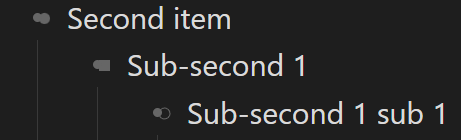
If you zoom out enough, they overlap each other almost completely, and it just looks a like normal (if a little fuzzy around the edges).
Foiled! I tested against other Obsidian themes to see if it was a theme or Obsidian issue, and I think it's both. "80s Neon" gave an even weirder result.
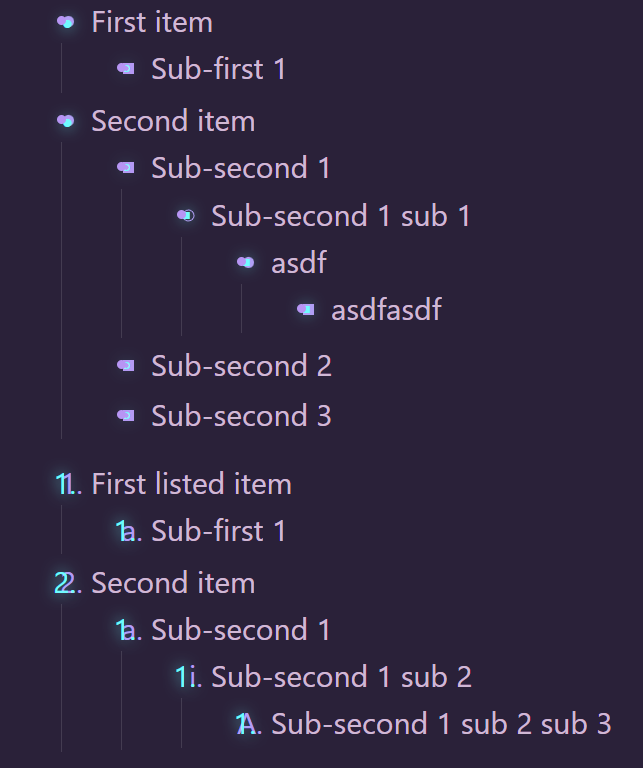
It looks like it has its own list formatting for unordered lists, after square, just repeats square, but IT TOO is overlapped by Obsidian's own list preferences, and it was created by actual developers.
I was very disappointed, but I feel like I learned a lot[1]. Even though it didn't work, I forked[2] the code I worked on to another branch[3], so you can see what I've done, and maybe use it on your own project. You can find that branch here: GitHub - WiseGuru/obsidian-automatic-list-styles at 2-can-support-unorder-list
Good luck out there!
Here's the banner I used for reference:
const banner =
`/*
THIS IS A GENERATED/BUNDLED FILE BY ESBUILD
if you want to view the source, please visit the github repository of this plugin
*/
`;
Ok, maybe I didn't learn that much. ↩︎
Am I even using the right language? ↩︎
Also, while trying to stage all my changes so I could commit them to a branch for you, dear reader, to look at, Malwarebytes was absolutely losing its shit, and slowed my computer to a crawl. I couldn't stop it from losing its shit, so I had to reboot, quit Malwarebytes, and then finish staging my commits. Then I committed them, and it's working away, but I dunno how long it's gonna take man. ↩︎