Better Laptop Resolutions
I have a Framework Laptop 13, which comes with a default screen resolution of 2256x1504. It's a 3:2 aspect ratio that's also being used by a few other OEMs (Lenovo Yoga, Surface Pro, etc.), and while I generally like it, I wanted a screen resolution that was a little easier for the laptop to run in the hopes that it would improve battery life and performance.
All the other native resolutions end up as either Pillarbox[1] or Letterbox[2] and I wanted to make the most of my resolution.
First things first, I made a simple calculator in Excel:
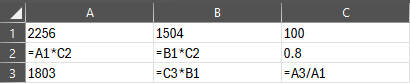
Formulas
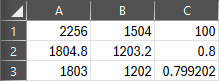
Example Values
- Column A is the horizontal resolution, B is the vertical, and C is the percentage of the original.
- Row 1 is the default resolution of 2256x1504
- Row 2 is the decimal number display resolution to a whole percentage point (e.g., 80%)
- Row 3 is the whole number display resolution to a decimal percentage (e.g., 79.9202%)
I use Row 2 to find the rough display resolution I want, and then Row 3 to find the whole-pixel resolution by adjusting A3 until B3 is a whole number.
For your reference, here's the resolutions and their rough percentage equivalents.
| Percent | Horizontal | Vertical |
|---|---|---|
| 100 | 2256 | 1504 |
| 90 | 2031 | 1354 |
| 80 | 1803 | 1202 |
| 70 | 1680 | 1120 |
| 60 | 1353 | 902 |
| 50 | 1128 | 752 |
| 40 | 903 | 602 |
NOTE: This doesn't guarantee against pixel smearing, but if your monitor isn't in your face it's not a huge deal.
Once I had my numbers, I downloaded ToastyX's Custom Resolution Utility (CRU) and manually created the resolutions, and it looks great!