Configuring Intention
Intention is a browser plugin that helps bring internet browsing to an intentional level.
When you configure the plugin, you choose which sites are distracting for you, and you're given prompts when you go to the sites or spend time there, giving you an opportunity to disconnect. For every day that you don't go over your limit, you add a day to your streak, which can be a strong deterrent to going over your limit in the future.
But for me, the default functionality isn't as helpful; I'm often taken to "distracting" sites in the course of my work, but I find myself doomscrolling, which consumes my energy and happiness.
My brother showed me a better way, and I wanted to share it here.
Being more Intentional
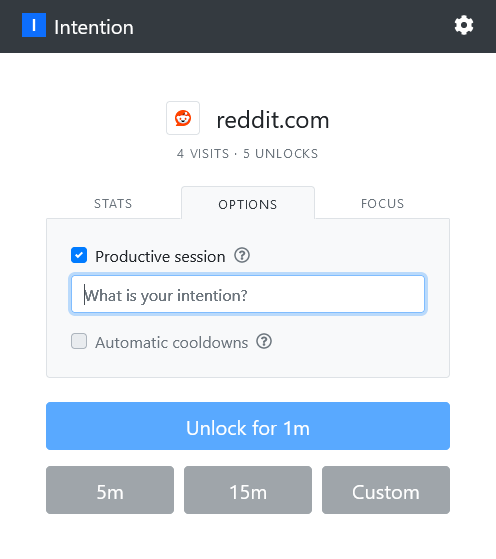
The basic idea is using a "Productive session" instead of a regular session. This doesn't contribute to the time spent on distracting sites, but also requires you to type in your intention for the time spent. This adds another layer of intentionality, one more breaking point where you have to sit up, type in something, and hit unlock.
For his configuration, he set the "Daily Distraction Limit" to 0 hours/minutes, and would only use the Productive Session unlock.
You can set a productive session through the popup by clicking on the "Options" tab, checking the box for "Productive Session," and then typing in your intention and unlocking the page.